Overview
Prompt Analyzer Implementation Details
Prompt Analyzer is a Streamlit-based application designed to process and analyze natural language prompts using advanced embedding models and metrics. It provides tools for sorting prompts by various quality metrics and supports exporting results for further analysis.
Highlights
Interactive Interface: Built using Streamlit for user-friendly operation.
Customizable Analysis: Users can select metrics like Semantic Vocabulary Richness, Relevance, and Lexical Density.
Advanced Embeddings: Utilizes SentenceTransformer models for semantic representation.
Prerequisites
Install Dependencies: Ensure all required Python packages are installed: .. code-block:: bash
pip install streamlit sentence-transformers scikit-learn nltk pandas
Download Pre-Trained Models: Ensure that SentenceTransformer models (e.g., “all-mpnet-base-v2”) are available locally. These are downloaded automatically during the first run.
Python Environment: Use a Python environment (3.8 or higher) for smooth operation.
Architecture Overview
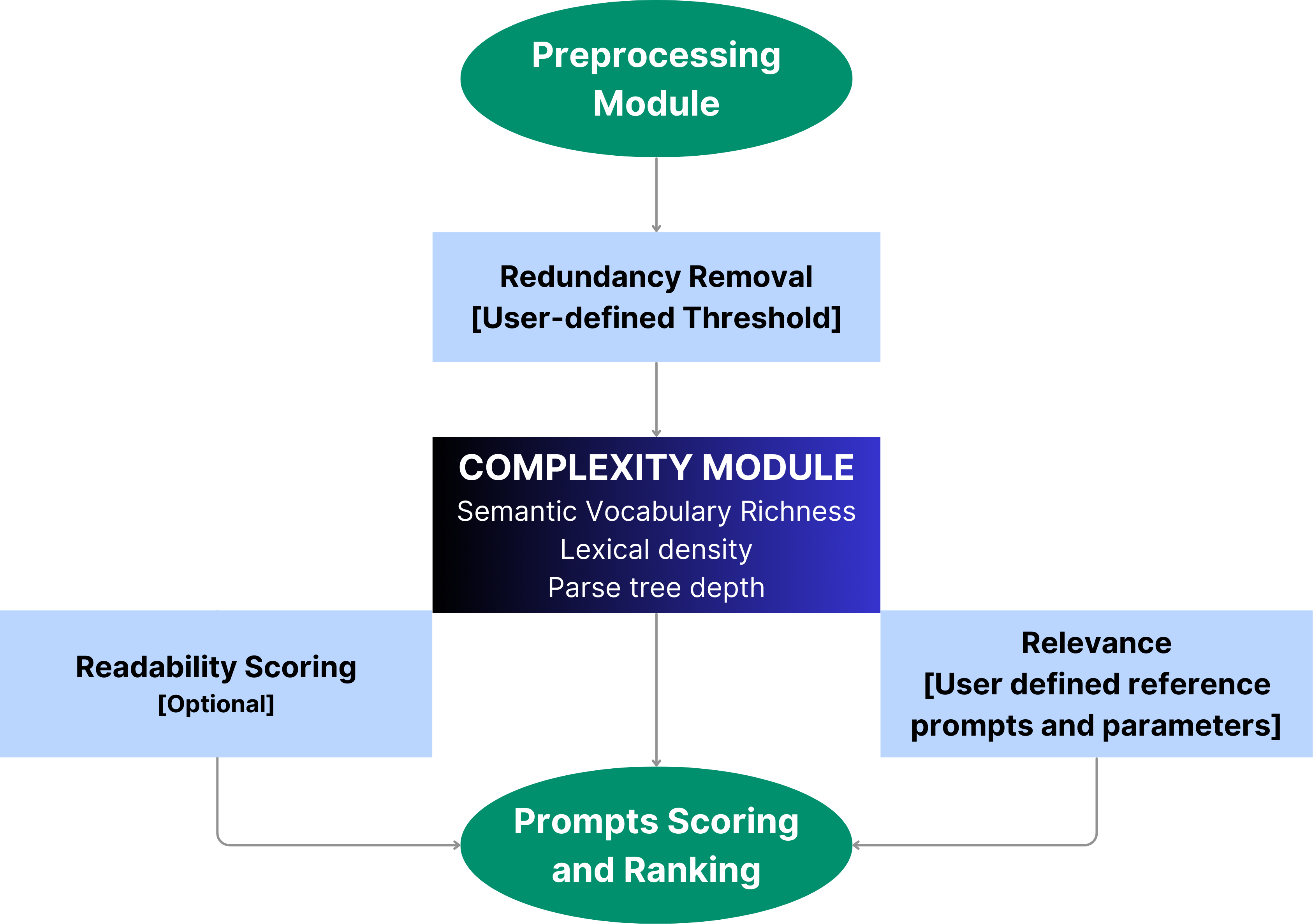
The application follows a modular architecture detailed below:
Dependencies - Key libraries include:
Streamlit for the user interface.
SentenceTransformer for generating embeddings.
scikit-learn for computing similarity and clustering.
nltk for tokenization and syntactic analysis.
Embedding Model - Model: “all-mpnet-base-v2” - Embeddings are generated for each prompt and used for computing semantic metrics like Semantic Diversity Score (SDS) and Relevance.
Frontend (Streamlit) - Interactive interface with options for:
Entering test prompts and optional reference prompts.
Selecting sorting metrics.
Displaying results in a table format.
Enabling file download for processed results.
Backend (Prompt Analysis and Sorting) - Text Processing:
Tokenizes text, removes stop words, and processes input prompts.
Metric Computation: - Metrics like Semantic Richness, Lexical Density, and Parse Tree Depth are calculated for each prompt.
Sorting and Scoring: - Prompts are scored based on the selected metric and sorted for display.
Relevance Analysis: - Uses hybrid metrics (semantic, lexical, and structural) to compute relevance between test and reference prompts.
Main Functionalities - Prompt Analysis:
Prompts are analyzed using semantic and syntactic metrics.
Relevance Computation: - Test prompts are compared to reference prompts for relevance.
Redundancy Removal: - Removes redundant prompts by comparing embeddings and keeping the most relevant ones.
Code Walkthrough
1. Embedding Initialization
Model: “all-mpnet-base-v2”
SentenceTransformer is used to generate embeddings for each prompt: .. code-block:: python
from sentence_transformers import SentenceTransformer model = SentenceTransformer(“all-mpnet-base-v2”) embeddings = model.encode(prompts_list)
2. User Interface
Sidebar options include: - Text input for entering prompts. - Metric selection dropdown. - Optional reference prompt input for relevance analysis. - Analyze button to start processing.
3. Prompt Processing
Text Preprocessing: - Tokenizes text, removes punctuation and stop words using nltk.
Embedding Generation: - Converts prompts into dense vectors using SentenceTransformer.
4. Metric Computation
Semantic Richness: - Combines Semantic Diversity Score (SDS) and Semantic Repetition Penalty (SRP).
Lexical Density: - Measures the proportion of content words in a prompt.
Relevance: - Combines lexical, semantic, and structural similarity scores.
5. Result Display and Export
Results are displayed in a table and can be exported as JSON for further analysis: .. code-block:: python
import pandas as pd df = pd.DataFrame(results, columns=[“Prompt”, “Score”]) st.table(df)
Usage
- 1. Enter Prompts
Input test prompts in the provided text box.
- 2. Select Metric
Choose a sorting metric (e.g., Semantic Vocabulary Richness, Relevance).
- 3. Analyze
Click the “Analyze” button to compute scores.
- 4. View Results
Sorted results are displayed in a table with optional download for processed data.
Technical Requirements
Python Packages: - Streamlit - sentence-transformers - scikit-learn - nltk - pandas
Hardware: - Recommended: GPU-enabled machine for faster embedding computation.